App mascot examples, ideas and names
By Param Nimbark · 27 October 2026 · Updated
Where does a mascot belong in an app, and what should it look like there? In the moments that carry a feeling more than content: the empty screen a new account opens on, the wait while something loads, the error, and the win. Below, one mascot stands in all four. After that come five brand mascots from real products and what each one teaches, ideas for choosing your own, and how to name it.
Personifold wrote this guide, and we sell original app mascots. Every fact about another brand’s mascot was read on that brand’s own pages on 27 October 2026, and this page shows none of their artwork: follow the links to see them.
1. One mascot in four app states
-
Empty
Notes
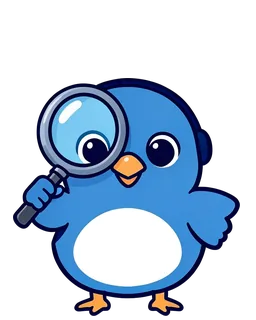
No notes yet
Tap the mic and talk.
Start a note -
Loading
Notes
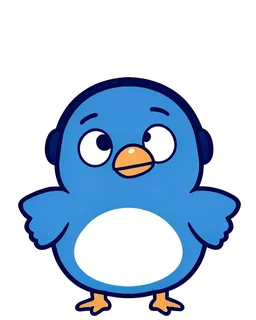
Writing it down
Turning your words into text.
-
Error
Notes
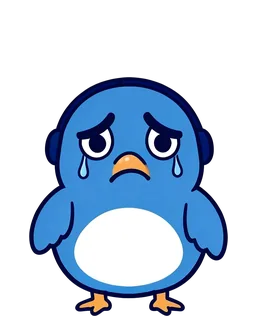
Lost the microphone
Check it is plugged in, then try again.
Try again -
Success
Notes
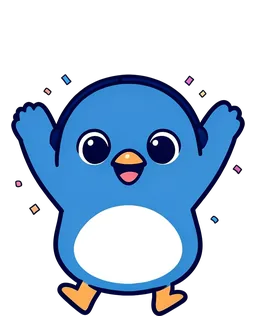
Note saved
Copy it anywhere you like.
Copy text
Each state asks for its own pose and its own line:
- Empty. A new account opens on a screen with nothing on it. The mascot points the way in: a searching or waving pose, one line that says what will go here, and one button for the first step.
- Loading. A thinking pose or a short loop says the app is working. Keep the line short, and if the wait runs long, say what is happening instead of adding a joke.
- Error. A sorry pose, never a laughing one, because the person just lost something. The words carry the fix, such as “check the microphone, then try again”, and the mascot never blames the person.
- Success. The celebrate pose, once, then out of the way, with the button on the next step.
Add a hello pose for the first-run welcome, and the searching pose doubles as the 404 page. To see your own app this way, the mascot demo on our home page puts any of our mascots in a sample app with your app’s name and brand colour, moment by moment.
2. Brand mascot examples from real products, and what each teaches
These five come from software brands. Every fact is from the brand’s own page, read on 27 October 2026.
Chrome’s offline dinosaur: an error people play. When Chrome has no connection, its offline page shows a dinosaur, and Google’s web.dev calls it Chrome’s offline page easter egg: press the space key, or tap the dinosaur on a phone, and the offline page becomes a playable arcade game. When an error is one the person cannot fix right away, give them something to do while they wait.
Ferris in the Rust book: three error poses, three meanings. The Rust Programming Language, the book on Rust’s own documentation site, uses a character called Ferris to flag code that isn’t meant to work: Ferris with a question mark means the code does not compile, Ferris throwing up their hands means it panics, and Ferris with one claw up, shrugging, means it does not do what it should. Each pose means one thing, and the book teaches all three in its introduction, before chapter 1.
GitHub’s Octocat: the mascot as the sample user. The Octocat has its own account on GitHub, and GitHub’s own guide to forking a repository starts at its practice repository, octocat/Spoon-Knife. Follow the guide and your first fork is the mascot’s project. Put the mascot inside the onboarding as the example, not beside it as decoration.
The Go gopher: no name, and older than the language. Go’s own blog calls the gopher “an iconic mascot” and says “the gopher has no name”: it is called just the Go gopher. It first appeared long before the Go project, as a promotion for the WFMU radio station, when Renee French designed a T-shirt for an annual fundraiser; for Go’s open source launch in 2009 she suggested adapting it as a mascot. The gopher images are under a Creative Commons Attribution 4.0 licence, so anyone may use them with credit to her. A mascot does not need a name to be known, and an open licence lets a community draw its own.
The Android robot: a mascot built to be shared. Android’s brand guidelines say the green Android robot can be reproduced or modified as long as a Creative Commons attribution line goes with it, and give its colour online as #3ddc84. Google keeps all trademark rights to the robot, and nobody may file a trademark for it or anything derived from it. The page puts it plainly: “We want to ensure that the Android robot remains available for all to use.” So decide early whether your mascot is open to fans and partners, like the robot and the gopher, or yours alone. Ours are the second kind: each is licensed to one brand and sold once.
Vox and Voxmelt: our own. Vox, the bird in the four screens above, is our first Launch Kit: built from the Voxmelt logo, two brand colours and Voxmelt’s Microsoft Store screenshots, then licensed to Voxmelt, our own voice app, on 12 October 2026. Its kit holds a 404, two empty states, an error state and a loading loop, and the Voxmelt case study shows every file, folder by folder.
What the five brand mascots share: each one does a job, whether that is marking an error, filling a dead end, showing a new user the way, or carrying a licence that lets others draw it.
3. App mascot ideas: start from the job, not the animal
The quickest way to a mascot that fits is to start from what the app does for people, then find the character. Six starting points, each with one of ours as the example:
- Draw what the app does. A dictation app gets a bird with a headset who writes down everything you say: that is Vox.
- Draw what the user is growing. A habit tracker gets a gardener: Kiwi is a red panda with a tiny watering can, and we list it as best for people growing small daily habits.
- Make the machine friendly. A developer tool gets a small robot with a screen face: Bezel, for engineering teams that rerun jobs often. Its face is a screen, so it can show the state too.
- Borrow an animal’s manner. A calm capybara in a knitted scarf for a planner: Bodhi, for people who plan more than they finish. A pangolin in overlapping scales for a private diary: Laali.
- Pick an object from your users’ world. A lime for a meal planner: Nimbu, for households tired of deciding dinner. A cactus in a terracotta pot for freelancers and creators with uneven pay: Sabja.
- Let the drawing style speak to the audience. Pixel art for people who make games: Kokum, a baby dragon, for designers, editors and indie game makers. Flat cartoon for a light team tool: Chikki, a goat with a bell collar, for small teams with big quarterly goals.
A brand mascot works outside the app too: on the link preview and the launch images, at the top of onboarding emails, as emoji and stickers in your Slack, Discord, WhatsApp or Telegram community, on the store listing, and in a short talking clip for the launch post.
Keep it away from moments of judgement: the pricing page, security claims, comparisons and anything a procurement team reads. One test settles each page: take the character out and ask whether the page became more trustworthy or just emptier. If it became more trustworthy, the mascot did not belong there.
4. App mascot names
- Keep it short. One or two syllables, easy to say and to spell, because the name ends up in emoji names, alt text, support replies and file names.
- Take it from the product. Vox takes the first syllable of Voxmelt, the app it was made for.
- Take it from what it is. A bezel is the frame around a screen, and Bezel is a robot with a screen for a face.
- Take it from your world. Four of ours carry food words: nimbu is a lime, chikki a nut brittle, kokum a fruit and sabja basil seeds. A word your users already know is quick to remember.
- Or skip the name. The Go gopher has none, and Android’s brand guidelines give the robot no name either: it is just the Android robot. A description people repeat can do the work of a name.
- Check it before you commit. Search your app store category and the handles you want. If the name must be yours alone, registering it as a trademark is the usual route; our licence says so too, and we do not search trademark registers or clear names for you.
5. Three ways to get one
Draw it yourself. Decide the poses before you draw the second one: hello for the welcome, searching for empty screens and the 404, thinking for loading, oops for errors, celebrate for success and thumbs up for small wins. Keep one reference sheet with a fixed palette, and check every pose at icon size. The hard part is keeping the character the same in every pose, not drawing it once.
Commission it, or generate it. A designer can draw the character and its poses: what a mascot design costs has designers’ prices from their own pages, and Personifold vs a Fiverr mascot designer sets a gig beside a kit. An AI generator gives you a first image fast; Personifold vs AI mascot generators covers what a credit or a month buys and who owns the image.
Buy one that is ready. Browse our original app mascots, each sold once: every mascot for sale shows six of its poses on its page, watermarked until it is yours. The Launch tier, $89 one-time, ships the states on this page as files: 12 poses as PNG and SVG with blink and talk frames, a 404, two empty states, an error state and a loader, plus launch images, emoji, stickers and a lip-synced talking clip, dressed in your colours and logo within 5 days of a short brief. Compare the three Launch Kit tiers, from $49 to $149.
We wrote this page and we sell that kit, so weigh the first two routes as fairly as the third.
Questions
What are good examples of app mascots?
Five from software brands, each read on its owner's own pages on 27 October 2026: Chrome's offline dinosaur, which turns the no-connection page into a game; Ferris in the Rust book, who marks code that does not compile or panics; GitHub's Octocat, whose practice repository starts GitHub's guide to forking; the Go gopher, which has no name; and the Android robot, which anyone may use with an attribution line. Our own is Vox, made for our voice app Voxmelt.
Where should a mascot appear in an app?
In the moments that carry a feeling more than content: the empty state, loading, errors, success, the first-run welcome and the 404. Keep it off the pricing page, security claims and anything a procurement team reads.
How do you name an app mascot?
Keep it to one or two syllables that are easy to say and spell. Take a syllable of the app's name, as Vox does from Voxmelt, name what the character is, or use a word your users know. A mascot can also go without a name, like the Go gopher. Search your app store category and the handles you want before you commit.
How many poses does an app mascot need?
One for each state you use: searching for empty screens, thinking for loading, oops for errors and celebrate for success, plus hello for the welcome. Each of our mascots for sale shows six poses on its page, and the Launch tier has 12 plus blink and talk frames.
Need a mascot for your app? A Launch Kit is an original mascot, sold once and licensed to your brand alone, with your launch files within 5 days of your brief.
See the mascots